JD Biersdorfer*
Streaming services have long provided the most popular way to listen to music, but downloading things digitally has its perks. That’s why some people still prefer to buy their music instead of renting it.
Downloaded files will eat into your device’s available storage space, but you don’t have to worry about inconsistent playback from an unstable internet connection or chewing through megabytes on a metered data plan. And, with some online stores, buying music directly puts more money in the artist’s pocket.
So whether you stream, download or both, here’s a guide to storing music on your phone so you can play it wherever you are.
Offline Listening
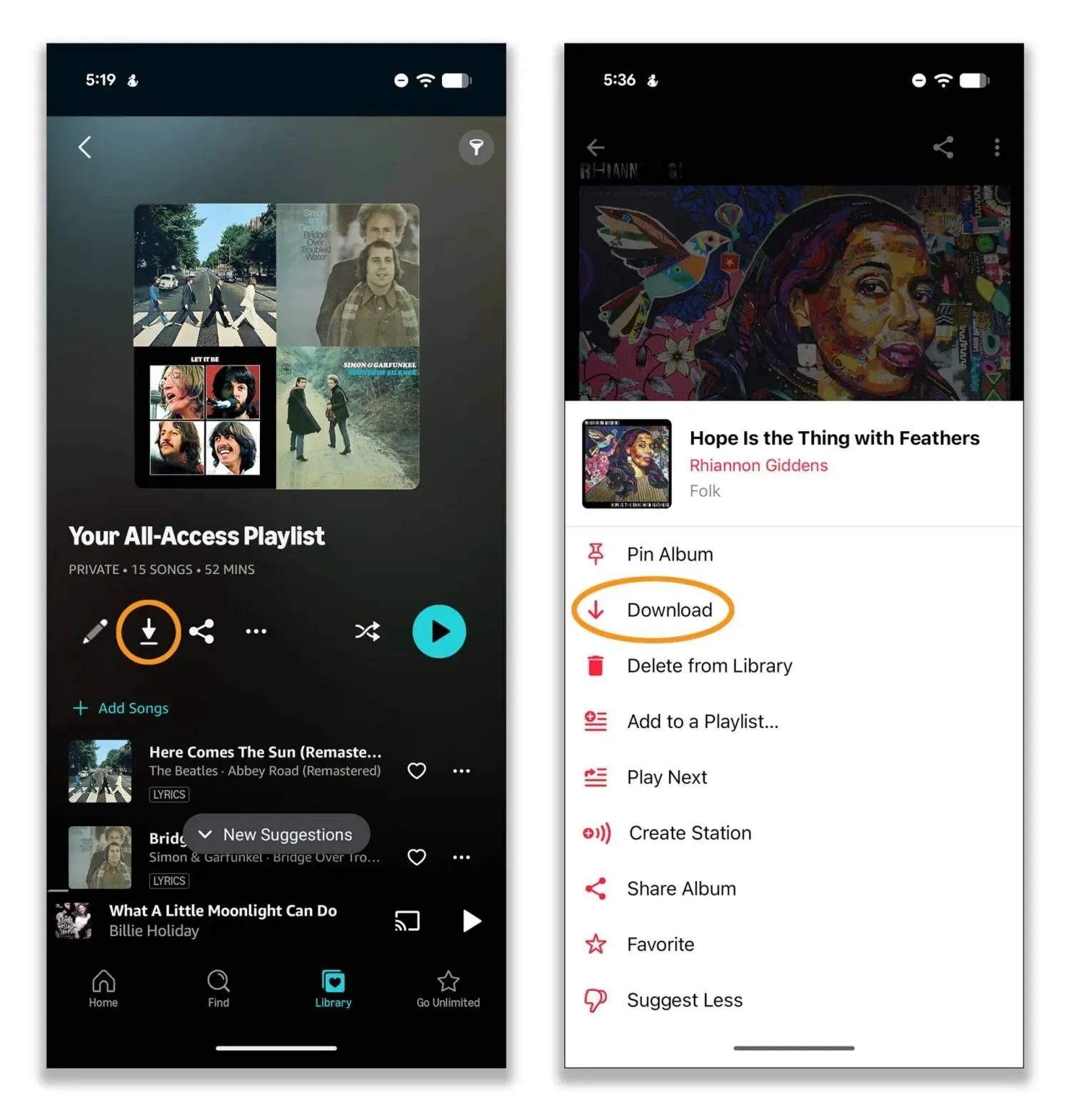
If the occasional lack of internet connectivity is your main issue with streaming, most major services allow you to download songs to your phone for playback when you’re offline. However, the files are not permanent, and you may need to have a paid subscription at a certain tier.
Amazon Music, Apple Music, Pandora, Qobuz, Spotify, Tidal and YouTube Music are among the subscription services with an offline-listening option. In most cases, just look for a downward-pointing arrow or menu with a download option. Then collect the tracks you want to take along before you leave on that camping trip or lengthy flight.
Personal Libraries
Before streaming services, many people kept a music library of audio files ripped from compact discs or purchased from digital stores. If you’ve never gotten around to adding those files to your phone, you can copy them with a few different methods. (Note that tracks that were originally sold with copyright protection might not play.)
If you adopted YouTube Music after Google discontinued its Google Play Music store in 2020, you can upload up to 100,000 songs to YouTube Music from your computer — even with a free plan. Then you can download them to your phone for offline listening in the YouTube Music mobile app.
Go to music.youtube.com in your computer’s web browser and drag the audio files into the browser window. (Or, click on your profile photo in the top-right corner of the window, choose Upload from the menu and select the files.) Tracks in the FLAC, M4A, MP3, OGG and WMA formats work, but not M4P files or other copy-protected formats.
If you subscribe to the Apple Music streaming service on your iOS or Android device, you can download files previously purchased from the iTunes Store to the Music app by tapping the download arrow next to the title.
If you don’t subscribe to Apple Music, iOS users can download the files from the iTunes Store app. Just tap the Purchased tab and then Music to see your list. Tap the Download icon to send the files to the Music app.
Alternatively, Apple’s iTunes Match service ($25 a year), uploads the music library on your computer — including songs you’ve ripped from CDs — to the cloud. You can then download those songs on iOS devices using the same Apple account.
Traditional methods of transferring files between computer and phone using cloud-storage sites or USB cables may also work. Apple’s support site has a guide for manually syncing music libraries between computers and its iOS-based devices.
You can also find third-party tools like Droid Transfer for transferring files between PCs and Android phones, and DoubleTwist CloudPlayer for music stashed on file-storage sites.
Where to Buy
Digital download shops have been around since the 1990s, although buying songs now might take extra steps. Thanks to app-store regulations, you now typically buy files from the company’s website, then download them in its separate mobile app.
For example: Amazon Music. You purchase audio files on the Amazon website and download them to your phone from the Purchased tab in the Amazon Music mobile app.
Similarly, the Qobuz subscription service has a music store on its website and mobile apps for Android and iOS to download purchases.
SoundCloud and Bandcamp, both distribution platforms highlighting independent artists, let you stream and buy digital music downloads.
A Windows version of iTunes still exists, but Apple retired the Mac software in 2019 in favor of its Apple Music app — which serves as both a subscription service and the jukebox software for your personal audio library.
You can still buy music directly through the iTunes Store app for iOS, where it lands in the Music app. And the Apple Music app for Windows and Mac computers has an iTunes Store section.
If downloading music brings memories of those peak iPod years, you can visually indulge yourself. Free apps like ClassiPod (for Android) or SepiaPod (for iOS) play your music library and provide a nostalgic interface right there on your modern smartphone.
*The New York Times